rmapzen: a mapzen api client for r


Introduction
rmapzen is a client for any implementation of the Mapzen
API. Though Mapzen itself has gone out of business,
rmapzen can be set up to work with any provider who hosts
Mapzen’s open-source software, including geocode.earth, Nextzen, and NYC GeoSearch from NYC
Planning Labs. For more information, see https://www.mapzen.com/documentation/.
The project is available
on github as well as CRAN.
rmapzen provides access to the following Mapzen API
services:
- Search: Structured and unstructured search and geocoding, reverse geocoding, and autocomplete.
- Vector Tiles: Basemap vector data.
- Isochrone: Calculation of areas reachable from a specified locations.
Installation and Set-up
rmapzen is available on CRAN. To
install:
install.packages("rmapzen")You’ll also need to set up options specific to the API provider you
end up using. rmapzen works with API providers who
implement the Mapzen API. In order to specify provider information (such
as URL and API key), use mz_set_host. There are custom
set-up functions for the following providers:
- geocode.earth, for search
services. Use the function
mz_set_search_host_geocode.earth - Nextzen, for vector tiles.
Use the function
mz_set_tile_host_nextzen. - NYC GeoSearch, for
search services using New York City’s Property Address Directory. Use
mz_set_search_host_nyc_geosearch.
As of this writing, there are no public providers offering the Mapzen
isochrone service, but mz_isochrone and related functions
are available. If you know of a provider not listed here, use the more
general mz_set_host function, and submit an issue so
we can create a custom set up function for future users.
Search
All of the services in Mapzen search have been implemented. Search functions:
mz_searchmz_reverse_geocodemz_autocompletemz_placemz_structured_search(what’s this?)
For example, to search for public library branches in Oakland, CA:
# load rmapzen and run provider set-up functions
library(rmapzen)
mz_set_tile_host_nextzen()
mz_set_search_host_geocode.earth()
oakland_public <- mz_search("Oakland Public Library Branch",
size = 20,
boundary.rect = mz_bbox(mz_search("Oakland, CA", size=1)),
focus.point = mz_geocode("Oakland, CA"),
boundary.country = mz_countries$USA)oakland_public## GeoJSON response from Mapzen
## Attribution info: https://search.mapzen.com/v1/attribution
## Bounds (lon/lat): (-122.29, 37.74) - (-122.17, 37.85)
## 25 locations:
## Oakland Public Library - Temescal Branch (-122.26, 37.84)
## Oakland Public Library - Rockridge Branch (-122.25, 37.84)
## Lakeview Branch Oakland Public Library (-122.25, 37.81)
## Golden Gate Branch Oakland Public Library (-122.28, 37.84)
## Brookfield Village Branch Oakland Public Library (-122.19, 37.74)
## ...Search can, optionally, be constrained to a particular country, data
layer, boundary rectangle, or boundary circle. Furthermore, search can
prioritize results near a given “focus” point. See
?mz_search.
Additionally, mz_geocode is a convenient function to
geocode an address, utilizing the more general mz_search
function.
mz_geocode("UC Berkeley, Berkeley, CA")## # A tibble: 1 × 4
## geocode_address geocode_longitude geocode_latitude geocode_confidence
## * <chr> <dbl> <dbl> <dbl>
## 1 UC Berkeley, Berkeley, … -122. 37.9 1Vector tile service
rmapzen provides an interface to Mapzen’s vector tiles
service. Tile requests can be specified using the x, y, zoom
coordinates of the tile service, as well as with a lat/long bounding
box. For instance, continuing the previous example:
library(tidyverse)
library(sf)

# mz_bbox is a generic that returns the bounding box of an object
oakland_tiles <- mz_vector_tiles(mz_bbox(oakland_public))

# vector tiles return all layers (roads, water, buildings, etc) in a list
roads <- as_sf(oakland_tiles$roads) %>%
    filter(kind != "ferry")
water <- as_sf(oakland_tiles$water)

labels <- as.data.frame(oakland_public) %>%
    mutate(name = str_replace_all(
        name,
        "(Oakland Public Library)|(Branch)", ""),
        name = if_else(name == "", "Main", name))

# make a quick static map that includes roads and oceans as reference
ggplot() +
    geom_sf(data = water,
            fill = "lightblue") +
    geom_sf(data = roads,
            size = .2, colour = "gray80") +
    geom_sf(data = as_sf(oakland_public),
            colour = "black", size = 1) +
    ggrepel::geom_label_repel(
        data = labels,
        aes(x = lon, y = lat, label = name), size = 3,
        family = "Roboto Condensed", label.padding = unit(.1, "lines"),
        alpha = .7) +
    theme_void() +
    theme(panel.grid.major = element_line(size = 0))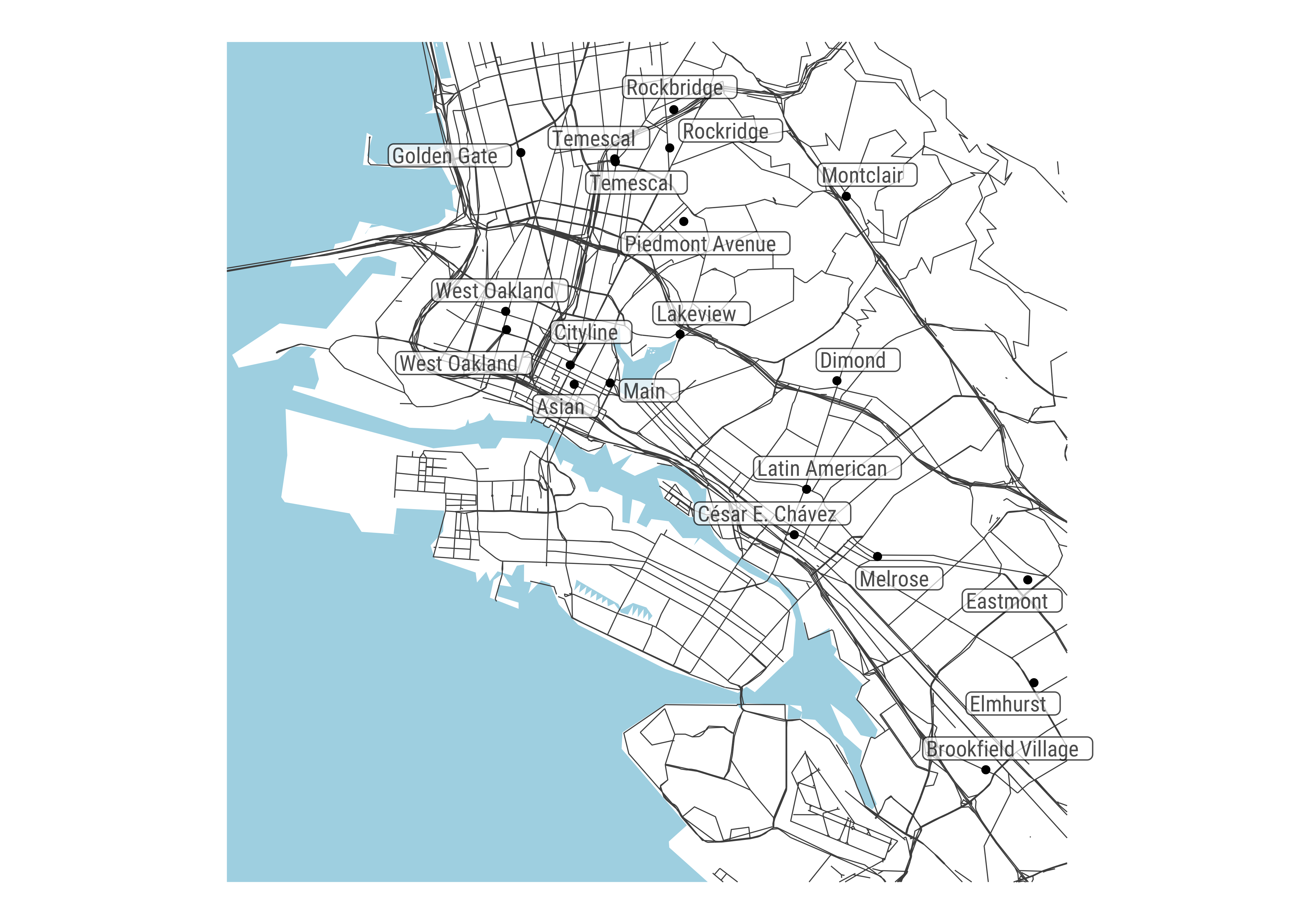
sf conversion
As some of the above examples illustrate, any object returned by a
Mapzen service can be converted to the appropriate sf
object using the generic as_sf, for easy interoperability
with other packages. You can also convert most objects directly to data
frames, allowing for use within tidy pipelines:
require(dplyr)
as.data.frame(oakland_public) %>%
    select(name, confidence, region, locality, neighbourhood)
## # A tibble: 25 × 5
## name confidence region locality neighbourhood
## <chr> <dbl> <chr> <chr> <chr>
## 1 Oakland Public Library - Temescal B… 0.926 Calif… Oakland Shafter
## 2 Oakland Public Library - Rockridge … 0.926 Calif… Oakland Rockridge
## 3 Lakeview Branch Oakland Public Libr… 0.664 Calif… Oakland <NA>
## 4 Golden Gate Branch Oakland Public L… 0.663 Calif… Oakland Gaskill
## 5 Brookfield Village Branch Oakland P… 0.663 Calif… Oakland South Stoneh…
## 6 West Oakland Branch Oakland Public … 0.663 Calif… Oakland Ralph Bunche
## 7 Elmhurst Branch Oakland Public Libr… 0.663 Calif… Oakland Webster
## 8 Montclair Branch Oakland Public Lib… 0.663 Calif… Oakland Montclair
## 9 Main Branch Oakland Public Library 0.663 Calif… Oakland Civic Center
## 10 Latin American Branch Oakland Publi… 0.663 Calif… Oakland St. Elizabeth
## # ℹ 15 more rowsAccessor methods
Currently, the following methods are available to pull out commonly used pieces of a response:
mz_coordinates(only available for search results): extracts lat/lon coordinates from search results, and returns them as adata.frame.mz_bbox: returns the bounding box of an object as adata.framewith columnsmin_lon,min_lat,max_lon, andmax_lat.
mz_coordinates(oakland_public)## # A tibble: 25 × 2
## lon lat
## <dbl> <dbl>
## 1 -122. 37.8
## 2 -122. 37.8
## 3 -122. 37.8
## 4 -122. 37.8
## 5 -122. 37.7
## 6 -122. 37.8
## 7 -122. 37.8
## 8 -122. 37.8
## 9 -122. 37.8
## 10 -122. 37.8
## # ℹ 15 more rowsmz_bbox(oakland_tiles)## # A tibble: 1 × 4
## min_lon min_lat max_lon max_lat
## * <dbl> <dbl> <dbl> <dbl>
## 1 -122. 37.7 -122. 37.9Convenience features
Several of the search functions take, optionally, the arguments
layers, sources, and
boundary.country (the latter requires ISO-3166 codes). If
you’re using an IDE with auto-complete, the objects
mz_layers, mz_sources, and
mz_countries should make it easier to get the correct
codes.
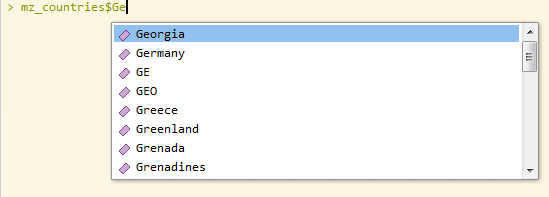
Similarly, argument constructors are available for easier specifications of isochrone and search requests.
mz_costingmz_costing_optionsmz_locationmz_contoursmz_date_time